
Modbus Server API
Configure the Edge Modbus server, understand the register map, and write grid limits via Modbus.
Features
- Support for both Modbus TCP and Modbus RTU
- Read only or Read write access can be configured for security reasons
- Read Edge information, main grid detailed information and subgrid information
- Write limits on any grid, in A or kW. Setting a safe current with a watchdog is possible.
- Live register map view in EdgeManager
- Register map download as CSV in EdgeManager
Configuration
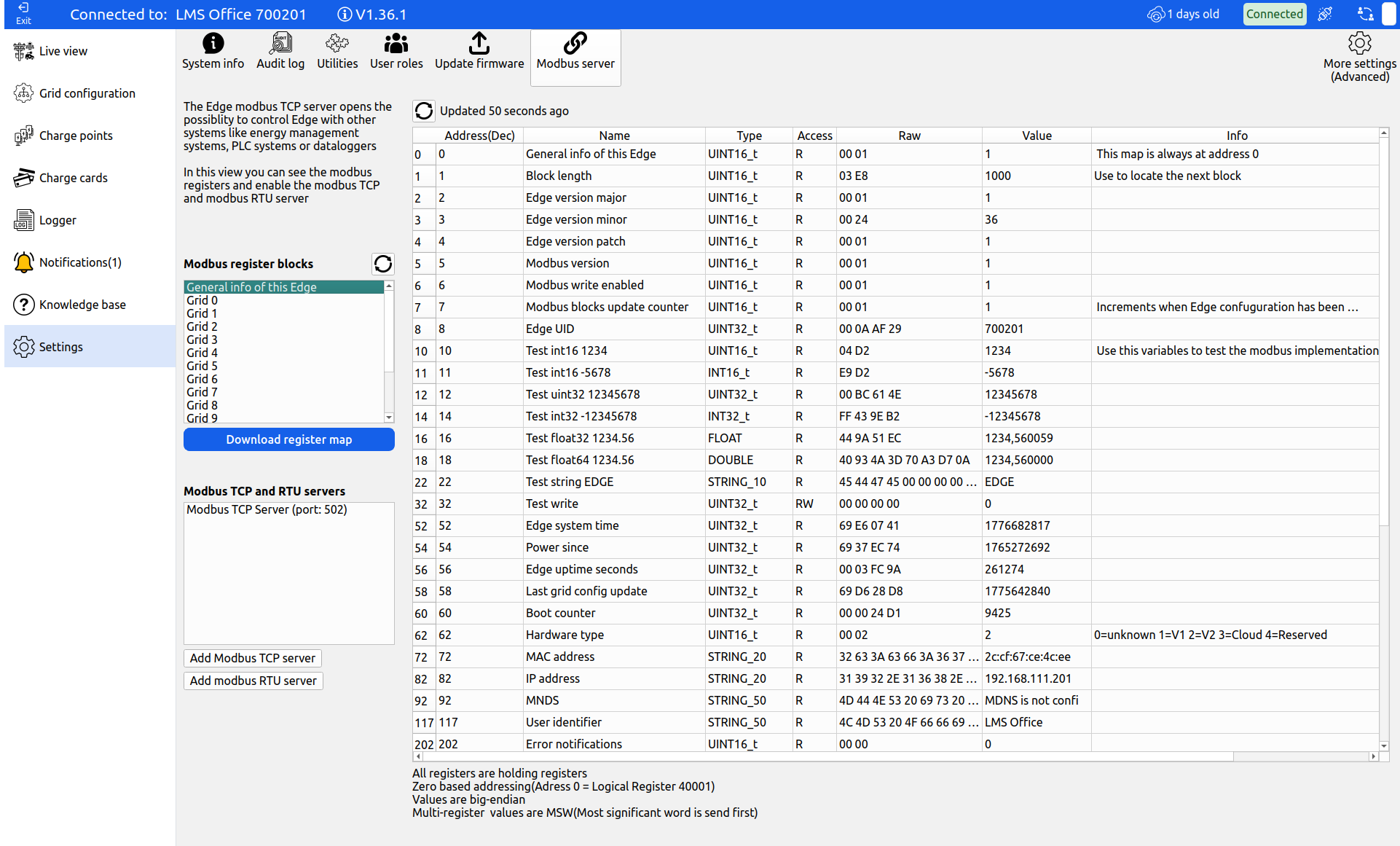
Login with EdgeManager to the desired Edge controller, navigate to the Settings tab and click Modbus server.
From this screen, the Modbus register map of Edge can be inspected, the register map can be downloaded, and Modbus server instances can be added or deleted.
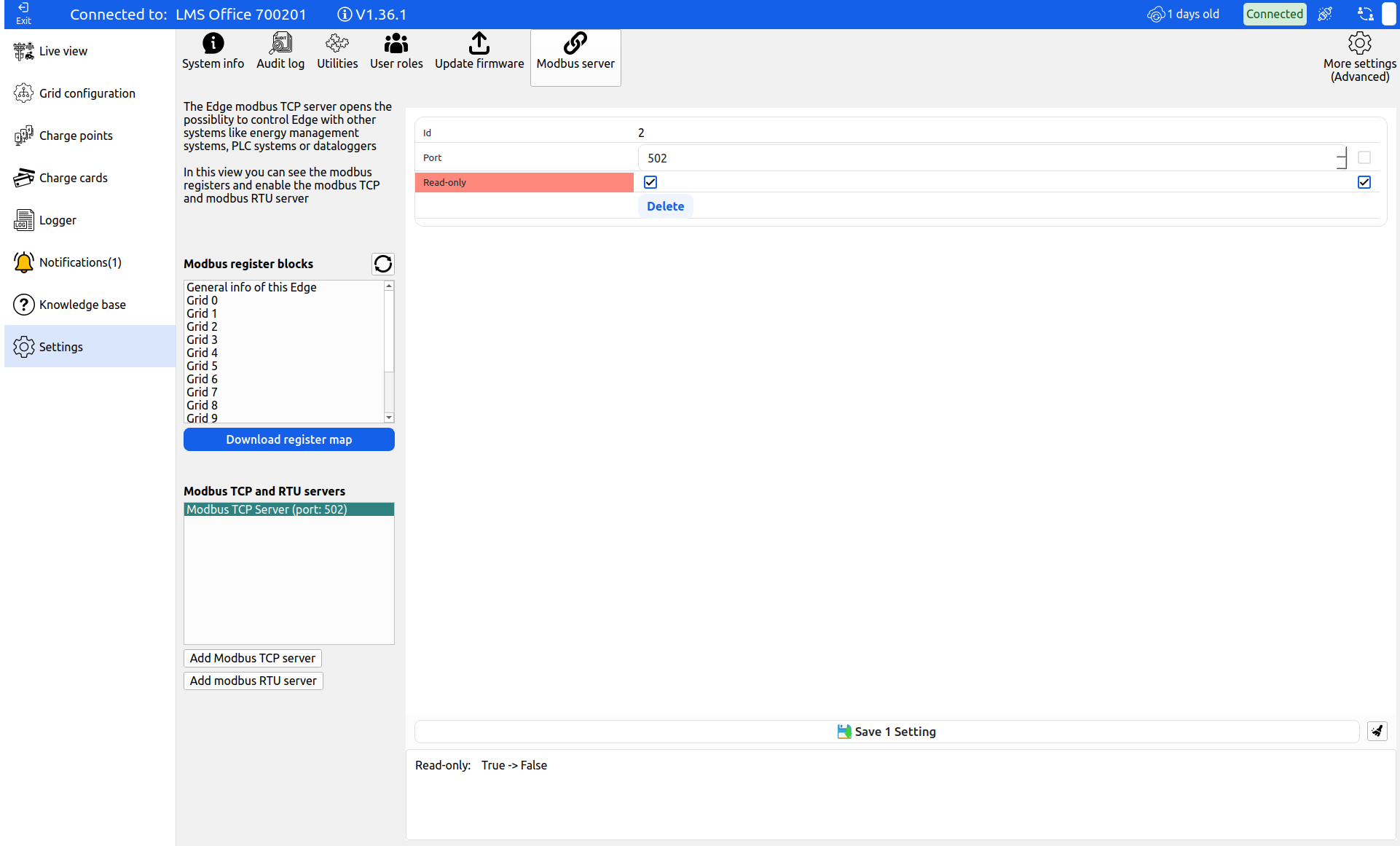
By default the Modbus server is Read-Only. If write access is needed, click on the Modbus server you are using and disable read only.
Modbus Conventions
Modbus is a standardized protocol, but different standards are used for addressing and types.
Edge has implemented the standards as follows:
- All registers are holding registers
- Supported function codes: 3 (Read holding registers), 6 (Write Single Register) and 16 (Write Multiple Registers)
- Zero based addressing is used (Logical register 40001 corresponds with register 0)
- Registers are Big-endian
- Multi-word registers are MSW
Modbus Map Format
Because an Edge installation can handle multiple grids and everything needs to be accessible using Modbus, Edge works with Modbus blocks in the same way the Sunspec protocol does, it has a chain of small Modbus register maps/blocks that together form a large register map. This chain of blocks allows for a dynamic and variable number of objects in the map. Each Modbus block contains a type and length register, using the length register the next block can be found.
Please note that the first part of the Modbus map is always in the same spot and does not require the implementation of this dynamic map. The first two blocks "General map" and "Grid 0" are always in the same place with static addressing which can simply be taken from the register map.
Configuration Changes
When the Edge configuration is changed by adding or deleting assets or changing the grid configuration, this may cause a rebuild of the Modbus register map, which may cause compatibility issues with third-party applications reading from the map.
When the Modbus map is rebuilt, general register 7: "modbus blocks update counter" is incremented. This register can be used to check if the map (and thus the Edge configuration) has been updated.
Also, Edge will disconnect all its Modbus TCP clients when the register map is updated to trigger a reinitialize at the client side.
Interfacing with the Loadbalancer
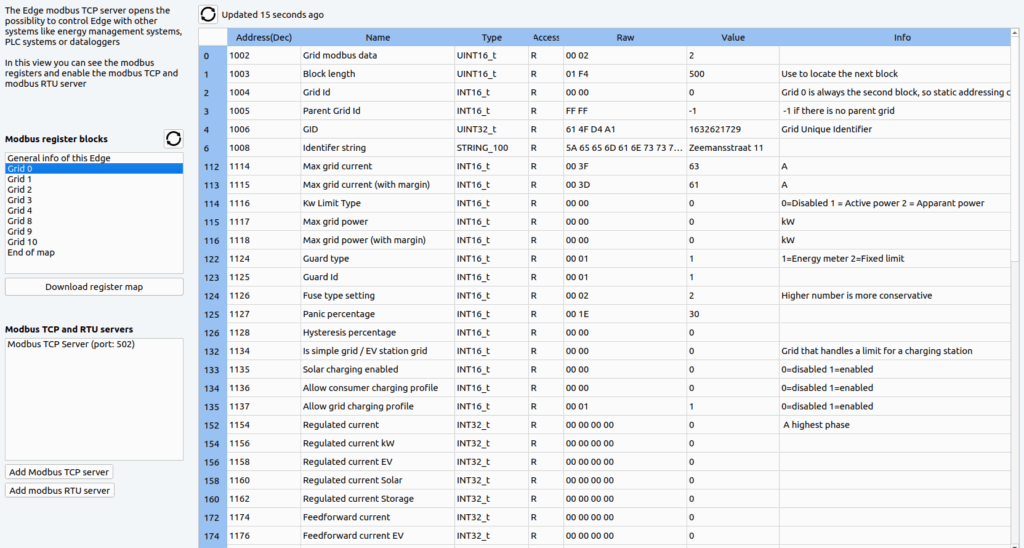
When you want to control all the chargepoints connected to Edge you can do that by interfacing with block "Grid-0". This block comes after the first generic map and will therefore always have static addressing. Make sure that all chargepoints on Edge are placed in grid 0, otherwise it is advised to change the grid-config so that grid 0 is on top.
When interfacing with this grid-block the following variables are available to read:
- Configured max grid current and/or power
- Real-time regulated current and regulated power: regulated means current from assets that Edge can control
- Guard current and power: Optional register if an energymeter is installed in the grid. This meter measures everything. (Regulated + Unregulated like a building)
- Total active consumers (EV's charging), EV's with priority, amount of EV's that are limited by Edge
- Estimated max potential EV power demand (Useful when the loadbalancer is slowing down the charging sessions)
- Netto EV power demand, the amount of power the EV's can charge more.
To review all registers, login to your Edge with EdgeManager and download the register map.
Writing Limits via Modbus
If you want to set a limit to the grid, the following Modbus Limit registers are available:
- Limit enable
- Unit: A or kW
- Type: soft, normal or hard — determines how strict the limit is and determines the margins and response times
- Discard energy meter (or guard): If enabled, the limit applies to the regulated consumption of EV's, instead of to the total building + EV current consumption
- Limit
- Limit watchdog: The number written to this register is decremented each second, when 0 is reached the safe limit will be used
- Safe limit
The Modbus limits will persist after Edge reboot.
Updated 6 months ago