
P1 smart meter
Connecting a DSMR5.0 smart energy meter to Edge V2
How to connect a P1 energy meter
Connect a DSMR smart meter with a P1 port to Edge V2 so you can measure site energy usage and use load balancing when your meter supports DSMR V5.0 or newer.
P1 smart meters are common in residential and small-business locations in the Netherlands and Belgium.
Before you start
- Confirm that your site uses a smart meter with a P1 port.
- Check the meter enclosure for DSMR V5.0 or newer if you want to use load balancing.
- Install the Edge V2 controller close to the smart meter to use a 1-meter RJ12 cable.
- Have access to EdgeManager so you can configure the meter after connecting it.
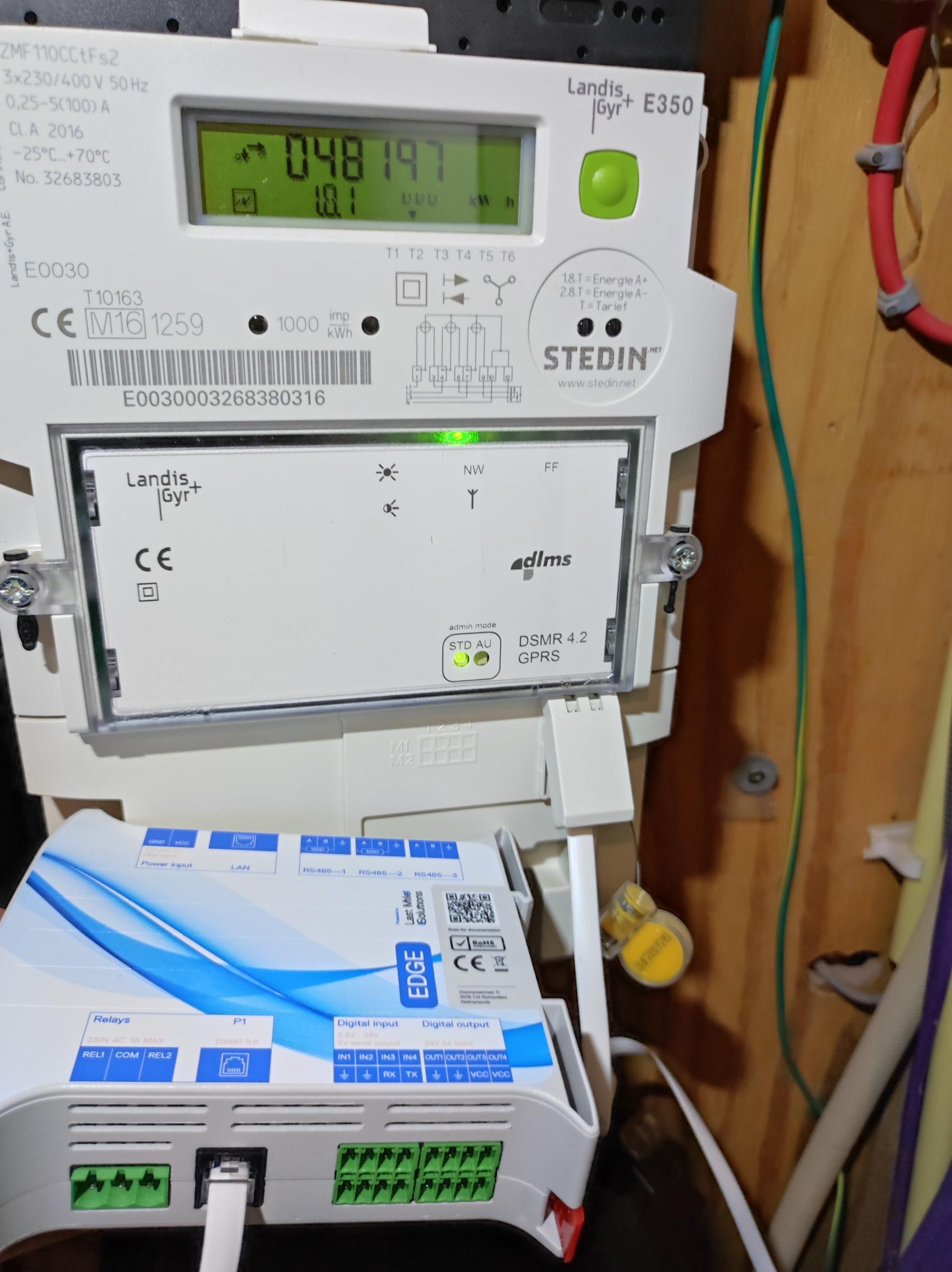
Edge controller connected to a DSMR 4.2 smart meter
Connect the P1 smart meter to Edge V2 with an RJ12 cable. This connection lets Edge read energy measurements without installing a separate meter.
DSMR V5.0
The P1 DSMR (Dutch Smart Meter Requirements) standard has multiple versions. Edge supports DSMR V4.0 and newer, but use DSMR V5.0 or newer for load balancing.
| DSMR version | Compatibility and notes |
|---|---|
| < DSMR 4.0 | Not compatible |
| DSMR V4.0 & V4.2 | Sends actual measurements every 10s We advise against using it for load balancing. |
| DSMR V5.0 | Sends actual measurements every 1s Usable for load balancing. |
How to find if my energy meter has DSMR V5.0
In the Netherlands, small-consumer grid connections typically include a smart meter with a P1 port.
Check the text on the meter enclosure for the DSMR version.
If the enclosure does not show the version, look up the meter brand and model online.
Comparison between P1 smart meter and Modbus meter
Using the existing smart meter can reduce installation cost and may remove the need to de-energize the installation. The RJ12 cable also makes the physical connection straightforward.
When you use a P1 meter, install the Edge controller close to the smart meter because the RJ12 cable is 1 meter long.
With a 1-second interval, the P1 interface is often fast enough for load balancing. However, some DSMR V5.0 meters average their measurements before sending them. That averaging delays the data that Edge uses for load balancing. If your site can tolerate short peaks above the contracted limit or fuse rating, this delay may be acceptable.
Therefore, we advice to use a Modbus energy meter for your most crucial locations where a quick response is needed.
How to configure the P1 meter in Edge
Log in to your Edge controller with EdgeManager.
If you do not yet have an energy meter in Edge:
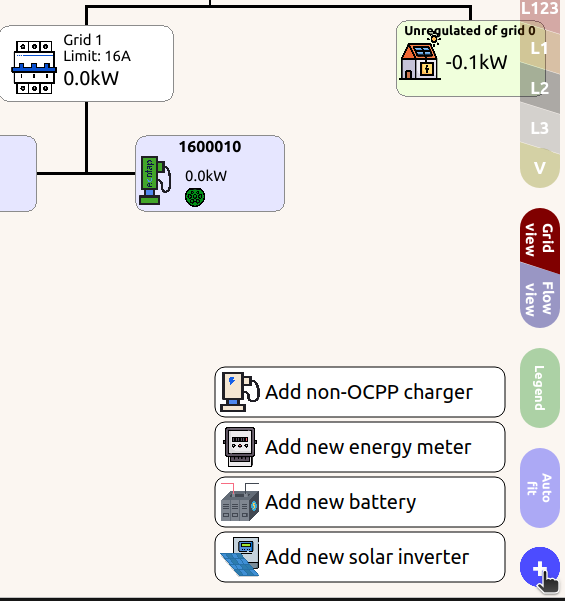
- Click the plus (+) icon in the bottom-right corner.
-
Click Add energy meter.
-
Select P1 port meter.
If Edge already has an energy meter but it is configured as a different type:
-
Click the energy meter.
-
When the energy meter dashboard opens, find the Model setting.
-
Select P1 port meter and save.
Smart meter P1 in Belgium
The grid operator Fluvius in Belgium does not enable the P1 port by default. Contact Fluvius to enable the P1 port.
Customers in Wallonia might need support from their local grid operator to enable the P1 port.
Updated 6 months ago