
Rest API
Edge also has a Modbus-RTU/TCP API.
See the Edge API reference for the technical API documentation.
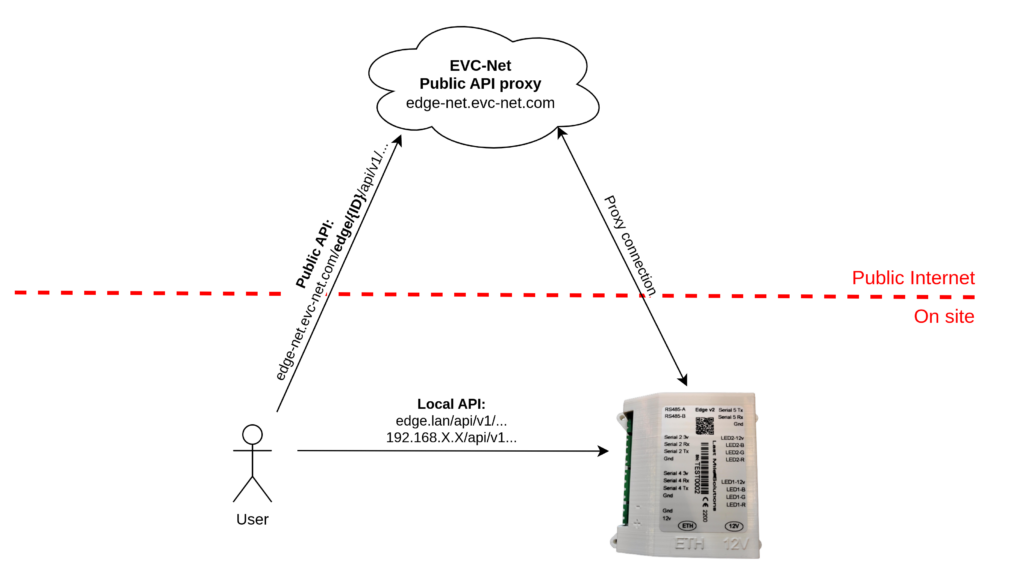
Our API is directly accessible when the requests are done directly to the Edge Device (Local). There is also a public API available where all requests are proxied to your Edge controller using Edge-Net.
With the API it is possible to make custom integrations with your own systems. In a nutshell, the Edge API allows for interaction with:
- Grid configuration
- Set External limits
- Chargepoints status
- Charge profiles on grids and stations
- Session/transaction monitoring
- Manage charge cards
- Manage components like energymeters
- Read Notifications
- Retrieve real time and historical measurements
Local API Access
When connecting to the local API, you have to be on the same network and use a URL in the same manner as a chargepoint would connect to Edge. Either a local static IP address has to be used, or Edge can be accessed using its mDNS name (edge.lan in most cases).
All endpoints from the API documentation have to be prefixed with the API version: /api/v1/
For example: https://edge.lan/api/v1/
User Roles and Access Management
An API key is required when communicating with the API. Configuration occurs via EdgeManager by navigating to Settings → API access, where you can set a name and role in the API access table. A key is automatically generated. The key must be passed as a header: X-API-Key: AABBCC112233
Public API
All Edge devices from version 1.24.5 and higher are also accessible using a public API. This means the Edge API is accessible from anywhere with an internet connection. Requests are proxied to your Edge controller via Edge-Net.
All endpoints from the API documentation have to be prefixed with the Edge device you want to reach, along with the API version: Edge/{ID}/api/v1/
For example: https://edge-net.evc-net.com/Edge/{ID}/api/v1/
User Roles and Access Management
You will have to obtain your public API key from EVC-net under Settings → System users → API token. The key has to be passed as a header: X-API-Key: AABBCC112233
By default, this key has READ-ONLY rights for your Edge controller. If you need write access, contact LMS support to have it enabled.
The public API is subject to a fair-use policy. Overloading the system will result in your access being revoked.
Local vs. Public API
The table below summarizes the differences between the local and public API.
| Local API | Public API | |
|---|---|---|
| Endpoint prefix | https://edge.lan/api/v1/ | https://edge-net.evc-net.com/Edge/{ID}/api/v1/ |
| Accessibility | Same local network only (static IP or mDNS name) | Anywhere with an internet connection |
| Request path | Direct to the Edge device | Proxied to your Edge controller via Edge-Net |
| Permissions | Configurable per key by the user in EdgeManager (any role) | Read-only by default; write access on request via LMS support |
| API key source | Generated in EdgeManager (Settings → API access) | EVC-net (Settings → System users → API-token-in) and press Generate |
| Availability | All versions | Edge v1.24.5 and higher |
| Fair-use policy | Not applicable | Applies — overloading the system with custom dashboards will result in access being revoked |
Updated 30 days ago