
Charging Station Behavior on Connection Loss
The content of this article is not required to know for normal operation of Edge. The topics are for when you want to understand and utilize Edge to its full potential.
Connection with EVC-net Lost
Edge acts as a stand-alone local backoffice. When your installation site loses internet connection, your chargepoints will remain working. Edge will sync all transactions to EVC-net when the connection returns.
Card Authorizations
By default Edge uses its own transaction database to authorize cards previously used at that location. If Edge cannot locally authorize a card when offline, it will accept the unknown card and sync the transaction with EVC-net later. This maintains site operation since invalid cards are rarely used during network outages. Card database behavior can be modified in Charge cards -> options -> Card database mode.
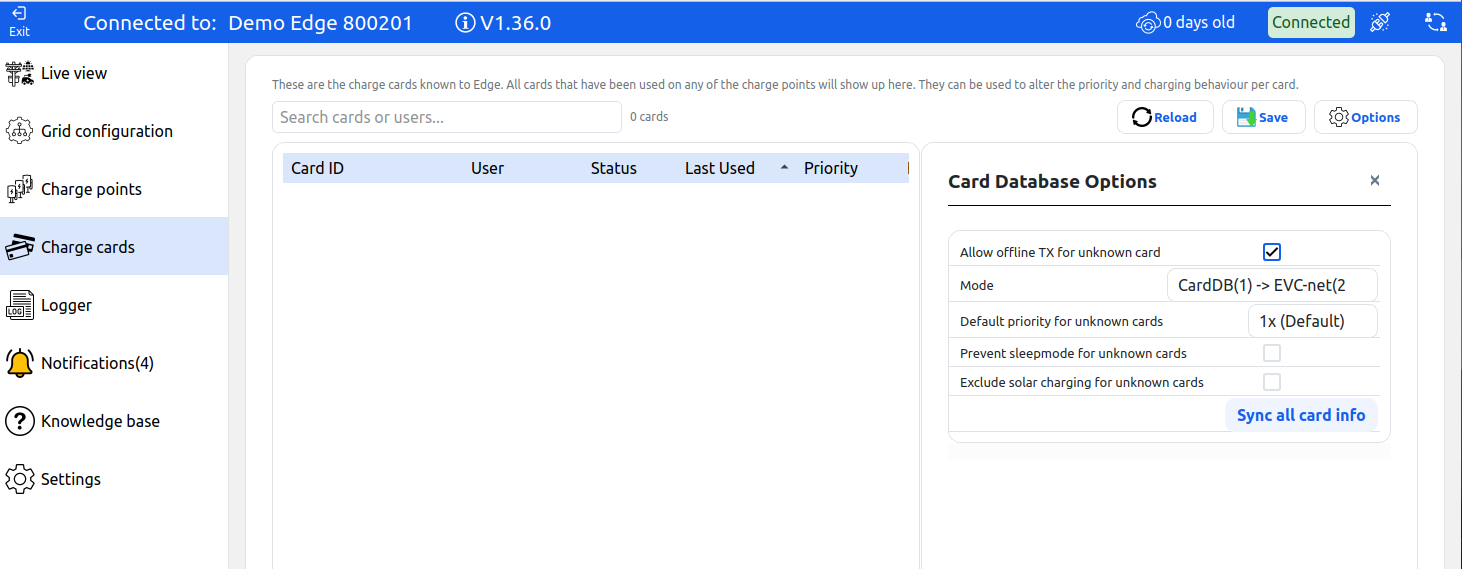
Allow offline TX for unknown card: Permits all cards for charging when there is no connection to EVC-net and the card cannot be authorized locally. This option is enabled by default.
Mode options:
| Mode | Description |
|---|---|
| CardDB(1) → EVC-net(2) (DEFAULT) | Checks local database first, then EVC-net. Fastest option but blocked cards remain valid in cache up to 2 weeks. |
| EVC-net(1) → CardDB(2) | Forwards authorizations to EVC-net first; uses internal database only if EVC-net is offline. |
| CardDB AND EVC-net | Authorizes through local database and also checks EVC-net. If EVC-net authorization fails, Edge stops the transaction after seconds. |
Connection with Stations Lost
While Edge is hardwired with Ethernet, chargepoints may theoretically go offline. Edge must ensure grid limits are not exceeded when stations or the controller are offline.
No Connection When Starting a Charging Session
By default, when a station connects to Edge it receives a default charging profile with 0A power usage. Only when the chargepoint starts a transaction does Edge overwrite this profile. This mechanism ensures chargepoints only consume power when they have a connection to Edge and the loadbalancer has determined that it is safe to charge.
Connection Loss During a Charging Session
Edge can send charging profiles that include a timeout. If the chargepoint does not receive a new profile within that timeout, it falls back to a safe current value. Edge resends profiles at a regular interval, so the chargepoint only enters safe mode when communication actually stops.
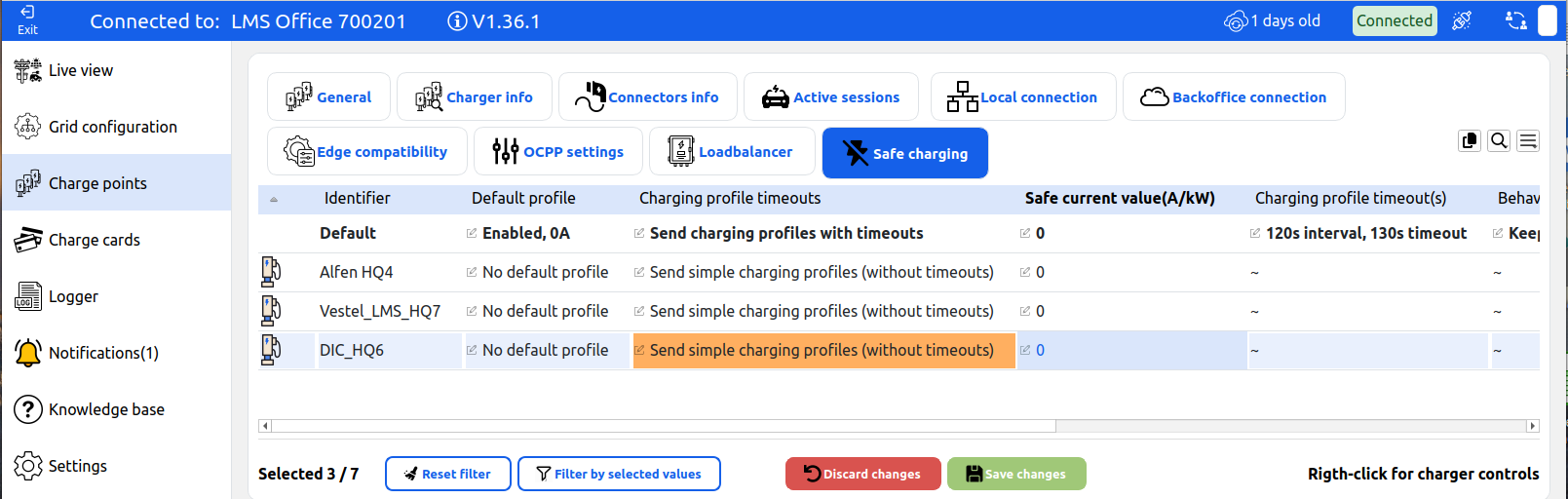
These settings are configured per chargepoint in the Safe charging tab.
Default profile
Controls what profile a chargepoint receives when it first connects, before any transaction starts.
| Option | Description |
|---|---|
| No default profile | No profile is sent on connect. The chargepoint uses its own default behavior. |
| Enabled, 0A | Station receives a 0A profile on connect, blocking charging until Edge sends an active profile. |
| Enabled, with safe current | Station receives a profile with the configured safe current value on connect. |
Charging profile timeouts
Controls whether Edge sends profiles with a built-in timeout.
| Option | Description |
|---|---|
| Send simple charging profiles (without timeouts) | Default. Best for chargepoint compatibility. Edge sends profiles without timeout timestamps. If connection is lost, the loadbalancer reserves the station's last known current. |
| Send charging profiles with timeouts | Edge sends profiles that include a timeout. If the chargepoint stops receiving updates within the timeout period, it falls back to the safe current value. |
Safe current value (A/kW)
The current the chargepoint falls back to when a timeout occurs. Set this to 0 to stop charging entirely, or to a low value (e.g. 6A) to keep the session alive at reduced power.
Charging profile timeout
When timeouts are enabled, this controls how often Edge resends profiles and how long the chargepoint waits before falling back to safe current.
| Option | Description |
|---|---|
| 60s interval, 70s timeout | Tight margin. Edge sends every 60s, chargepoint falls back after 70s without a profile. |
| 60s interval, 130s timeout | Edge sends every 60s, chargepoint tolerates up to 130s without a profile. |
| 120s interval, 130s timeout | Edge sends every 120s, chargepoint falls back after 130s. |
| 120s interval, 250s timeout | Default when timeouts are enabled. Edge sends every 120s, chargepoint tolerates up to 250s. Good balance for most installations. |
| 300s interval, 310s timeout | Relaxed send interval with tight margin. |
| 300s interval, 610s timeout | Most relaxed. Edge sends every 5 minutes, chargepoint tolerates over 10 minutes without a profile. |
Behaviour after timeout
Controls how the loadbalancer handles reserved current when a chargepoint goes offline.
| Option | Description |
|---|---|
| Keep last reported metervalue | Edge does not clear the reserved current. The loadbalancer keeps capacity reserved for the offline station. Use this when you do not trust the chargepoint to correctly apply the safe profile. |
| Clear reserved current (Trust charger) | Edge trusts the chargepoint to have applied the safe current and reclaims the reserved capacity for other loads. |
Even without charging profile timeouts, Edge handles offline chargers by reserving their current and correcting newly started transactions with energy meters installed. However, Edge cannot respond to congestion when offline stations plus building load exceeds grid limits.
Charging profile timeouts use OCPP charging profiles with two timestamps. Some chargepoints may interpret these differently. Test thoroughly with your station model first by enabling the settings and unplugging the network connector.
Updated 6 months ago