
Analyzing the Grid: Stubborn, Overshoot and Other Messages
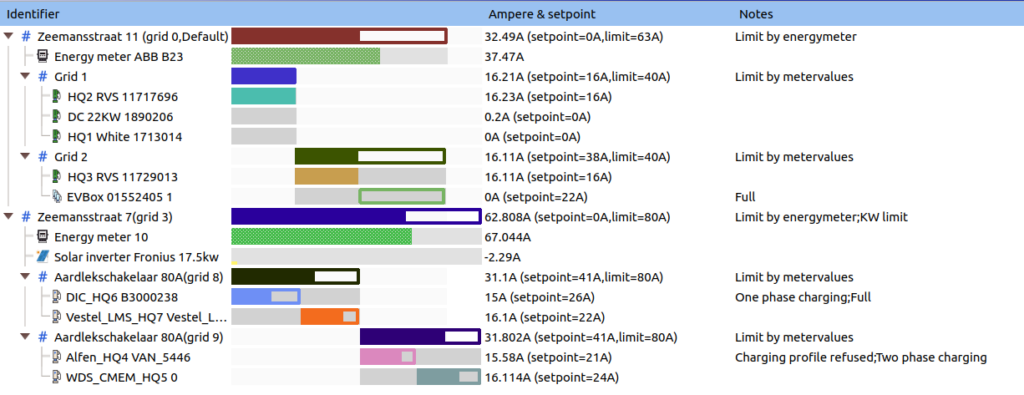
The grid configuration tab shows detailed information about the load balancing process of the chargers. The Notes column might show informative or error messages. Here is the explanation of some of these messages:
Status Messages
- Full: The EV is allowed to charge but is not charging, probably it's fully charged.
- One phase charging: Tells that the EV charges with 1 phase instead of 3 phases.
- Two phase charging: Tells that the EV charges with 2 phases instead of 3 phases.
Communication and Configuration Issues
- Charging profile refused: Charger refused charging profiles from Edge, loadbalancing might not work. Edge expects the charger not to respond to its charge profiles.
- Meter values timeout: Charger is not sending metervalues anymore, Edge knows its feedback may be invalid.
- Communication error: Charger is not connected to Edge.
- Not ready: Charger is connected but (stuck on) initializing. It is not ready for loadbalancing.
- Unsupported: Edge refused the charger during its initialization sequence. Edge could not automatically prepare the charger for loadbalancing, manual support required.
- In error: Charger channel is in error state.
Operational Challenges
- Sleep mode detected: Some types of EV's do not resume charging after they got a 0A setpoint. When this message occurs, Edge has detected that the car does not resume charging while it was not fully charged. (Potential solution: "Prevent sleepmode" can be turned on for specific charger cards). The loadbalancer will try to never assign these charging sessions a 0A setpoint.
- Station limit: A station with multiple channels has the maximum amount of current for all channels combined. This is handled by Edge (and might be the reason why it does not charge faster). Normally these limits would be configured in the chargepoint.
- ISO 15118: Charger and EV utilize the ISO 15118 protocol that provides more options. Usually these chargers report SoC (State of Charge).
- No phase info: Metervalues are received without phase information. The live view might have trouble visualizing this because information is missing. Edge will assume the power reported is the same on all phases.
- Unknown transaction: Edge did not receive a start transaction message and so it has no transactionId, consequently, loadbalancing cannot be done. This happens when a charger is connected to Edge with a running transaction. Please restart the transaction.
Load Balancing Limitations
- Stubborn: Edge analyzed that this EV is not charging at a constant rate (in respect to the setpoint) but is changing its charge rate in an unpredictable manner. Edge is handling this EV in a kind of safe mode. If applicable, please turn off any other smart charging algorithm active on the chargepoints.
- Overshoot: The EV does not respond to setpoints from Edge, so this charger or EV cannot be used for loadbalancing. Edge will detect this and handle it safely. However, if too many EV's are in overshoot mode Edge might not be able to safeguard the grid limit. Moreover, since Edge knows that the EV will not react to lower setpoints, the loadbalancer might assign 0A to every charger with overshoot and still ramp down some other chargers that are known to respond.
Connector-Level View
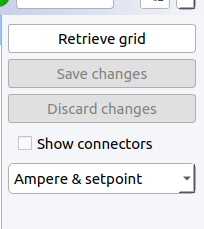
If you click the "Show connectors" checkbox on the right side of the Grid configuration tab, the information per charger channel is shown, instead of the data being grouped by chargepoint.
Updated 7 months ago
Did this page help you?