
Private Network Requirements & Setup Guide
This guide covers network requirements and installation procedures for Edge devices deployed on company private networks. It is specifically for installations using existing network infrastructure rather than GSM routers.
Network Requirements
Internal Incoming
- Ports 80 & 443 for chargepoint websocket connections
Internal Outgoing
- Port 502 for Modbus TCP (if used)
- Ports 80 & 443 for chargepoint web interface access
External Outgoing
- Ports 80 & 443 to
*.evc-net.comfor backoffice connection
Required Services
Edge, as a Linux-based controller, requires standard network services including NTP, DNS, and DHCP.
Chargepoints use FTP with the backoffice for firmware updates and diagnostic downloads. Ports used by this protocol may vary.
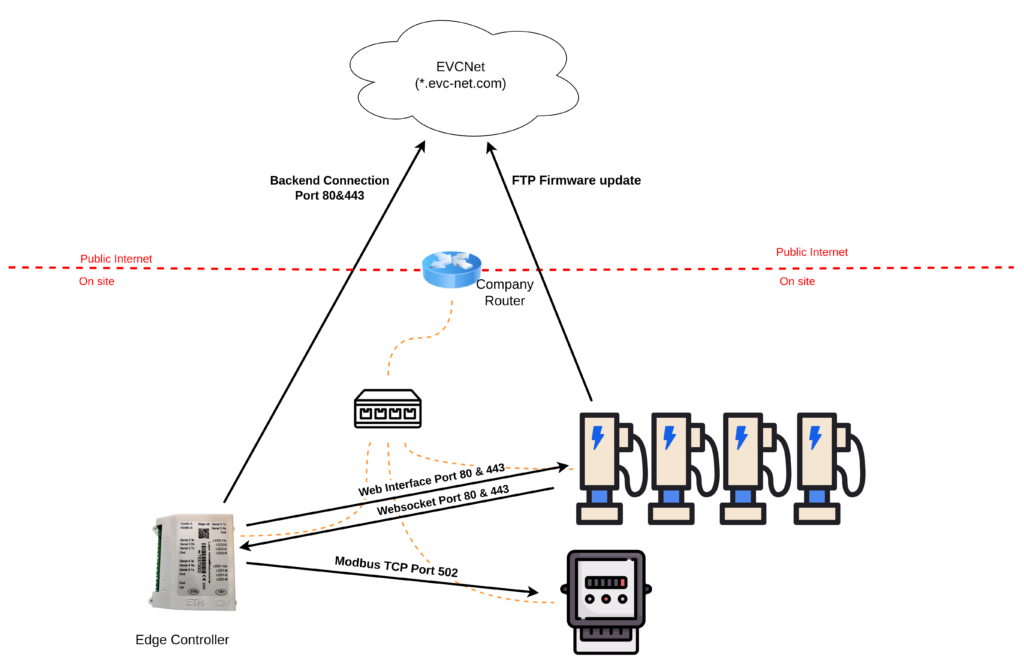
Installation on Private Networks
Connecting Chargers to Edge
Two connection methods are available:
- Configure chargepoints to connect to
ws://edge.lan(requires mDNS enabled) - Use the Edge's static IP address if mDNS is unavailable
Static DHCP Configuration
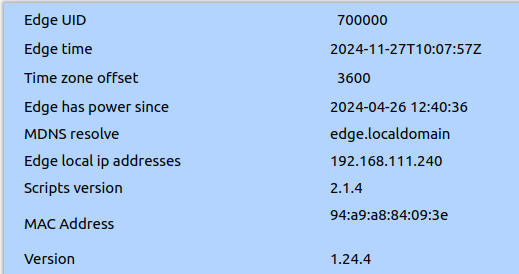
Static IPs cannot be directly set on Edge. Instead, configure a static DHCP lease on the router using the Edge's MAC address, found in EdgeManager's Settings tab.
Pre-Installation Checklist
- location supports:
- DHCP with mDNS enabled
- Static DHCP lease if no mDNS is enabled.
- Edge can establish outbound connections on ports 80 (HTTP), 443 (HTTPS), 21 (FTP), 53 (DNS), 123 (NTP)
- Chargers are permitted to connect to Edge (Port 80)
- Edge can connect to Modbus TCP devices (Port 502)
- Clear troubleshooting responsibilities defined
- Installation process documented and shared with stakeholders
Related Articles
- Installation Requirements
- Supported Energymeters
- How to Install Edge – Physical Installation
- How to Install Edge – Energy Meter Installation
- How to configure chargepoints to connect to Edge
- Trade-off: 4G router or company private network
Updated 5 months ago
Did this page help you?