
Connect an Ecotap (Master-Slave Grid) to Edge
Edge supports the legacy LMS/Ecotap protocol, enabling Ecotap master-slave configurations to connect via a single Ethernet interface on the master controller. Other controllers communicate through the master over the existing CAN bus.
4.2 controllers require an Ethernet module; 5.0 controllers include one by default. Supported firmware versions: 4.2 controllers require firmware 27.58 or 27.59 — other versions may cause grid malfunction. 5.0 controllers are not officially supported.
This guide assumes an existing operational master-slave grid. New installations should connect each chargepoint individually using Ethernet.
Step 1: Master Parameter Set Changes
- Set Primary host name to:
edge.lan - Set Protocol channel to:
Ethernet - Enable Force this EVC to be master:
True
Step 2: Master and Slave Parameter Set Changes
- Heartbeat timeout (minutes):
10 - Active status update interval (sec):
30 - Use online card check:
true - Send online EVC status notifications:
true - Send active updates in idle:
true - Disable local powergrid:
true
Step 3: Slave Parameter Set Changes
- Heartbeat timeout (minutes):
10
Step 4: Optional Watchdog Settings
Configure these to stop grid operation when Edge connection fails:
- Enable watchdog:
true - Watchdog timeout:
30 secondsor higher
Step 5: Save and Deploy
Save parameter sets and transmit to chargepoints.
Step 6: Edge Connection
Login to Edge using EdgeManager and wait for the station to come online.
Step 7: AES-Key Configuration
When the master chargepoint connects, Edge displays a notification requesting the AES-key.

Step 8: Retrieve Communication Key
Search for the station in EVC-net to copy the Communication-key. If unavailable, the station may still be part of the old network — remove it via the network tab in EVC-net.
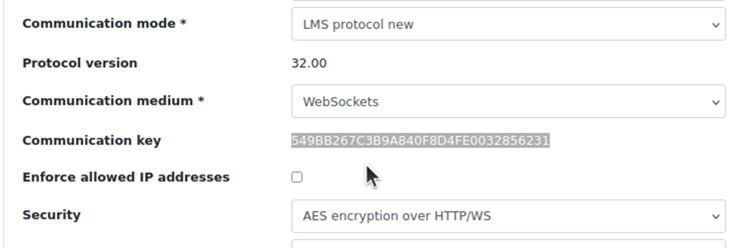
Step 9: Apply Key and Restart
Copy the AES-key, paste it into the notification where the missing AES-key was prompted
Step 10: Restart the chargers
This is required re-sync all the communication with Edge. Keep an eye on any remaining notifications in Edge to see if everything is going well
Updated 6 months ago